The calmer way to make slides
Start with an outline
Turn the notes we already write into a clear presentation.
- Keep the source simple
- Let the layout follow
Notes in. Slides out.
Write in your favorite editor on Mac, or directly in Deckset on iPhone and iPad. Deckset handles the layout.
For Mac, iPhone, and iPad. The Mac trial requires macOS Catalina (10.15) or newer.
# The calmer way to make slides
## Start with an outline
Turn the notes we already write into a clear presentation.
- Keep the source simple
- Let the layout follow
Trusted for talks, lessons, pitches, and updates at

How Deckset works
Write your notes, preview the slides, then present or export.
Start with what you already have.
Deckset applies the theme and layout as you write.
Rehearse, present live, or share a PDF.
30-second walkthrough
Simple underneath
Your presentation stays a plain-text Markdown file, easy to edit, share, and reuse.
See how Deckset uses MarkdownWrite anywhere
On Mac, write Markdown in your preferred text editor. On iPhone and iPad, write directly in the iOS app.
Build with structure
Headings, paragraphs, and lists create slides with a consistent layout. Choose a theme, then keep writing.
Keep details close
Keep context in presenter notes, preview the next slide, and rehearse with timing before you present.
Add what you need
Add images, video, tables, code, math, diagrams, columns, and custom themes while keeping the source readable.
Keep it simple
Your presentation stays a plain-text file that’s easy to edit, version, reuse, and export as a PDF.
Move between devices
Prepare at your desk, make a last-minute edit on iPad, and present from iPhone without recreating the presentation.
Use Deckset with AI
Give Codex, Claude Code, or another coding agent your notes, outline, or transcript. With Deckset’s authoring skill, it can create or revise the Markdown file. Open it in Deckset to check the slides and keep editing.
Made for real presentation work
For founders and teams
For educators
For AI-assisted work
Slide examples
Choose from more than 25 built-in themes, or create your own with custom fonts, colors, and layouts.
theme: Rakkas, 2
language: en-US

# [fit] MAKE ROOM
# [fit] FOR BETTER
# [fit] IDEAS
theme: Inter, 5
language: en-US
[.header: text-scale(2.3)]
[.header-vertical-alignment: bottom]

# Ideas
# in motion
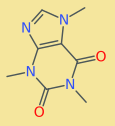
Caffeine is an alkaloid found naturally in coffee and tea.
Two fused rings contain four nitrogen atoms.
theme: Olive Green, 1
language: en-US

[.header: text-scale(1.6)]

# A closer look at caffeine

[.column: width(2)]

## C₈H₁₀N₄O₂

Caffeine is an alkaloid found naturally in coffee and tea.

Two fused rings contain four nitrogen atoms.

[.column: width(3)]

```smiles, [.description: Caffeine skeletal structure with two fused rings, four nitrogen atoms, and two carbonyl oxygen atoms]
CN1C=NC2=C1C(=O)N(C(=O)N2C)C
```

^ Source: https://www.ebi.ac.uk/chebi/CHEBI:27732
theme: Huerta, 2
language: en-US

[.header: text-scale(1.8)]

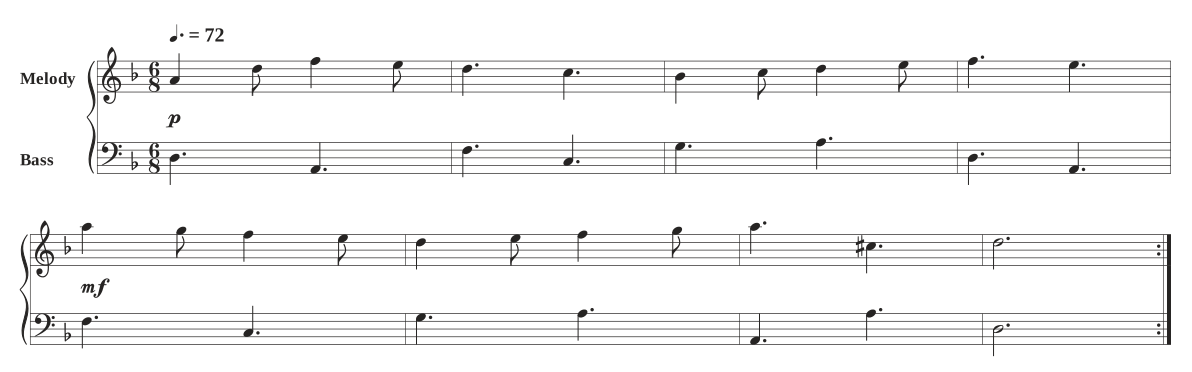
# Two voices. One conversation.

```abc, [.description: Original eight-bar duet in D minor, with melody and bass on two staves and a repeated phrase]
X:1
M:6/8
L:1/8
Q:3/8=72
%%score { 1 2 }
%%barsperstaff 4
%%stretchlast 1
V:1 clef=treble name="Melody"
V:2 clef=bass name="Bass"
K:Dm
[V:1] !p! A2d f2e | d3 c3 | B2c d2e | f3 e3 |
[V:2] D,3 A,,3 | F,3 C,3 | G,3 A,3 | D,3 A,,3 |
[V:1] !mf! a2g f2e | d2e f2g | a3 ^c3 | d6 :|
[V:2] F,3 C,3 | G,3 A,3 | A,,3 A,3 | D,6 :|
```
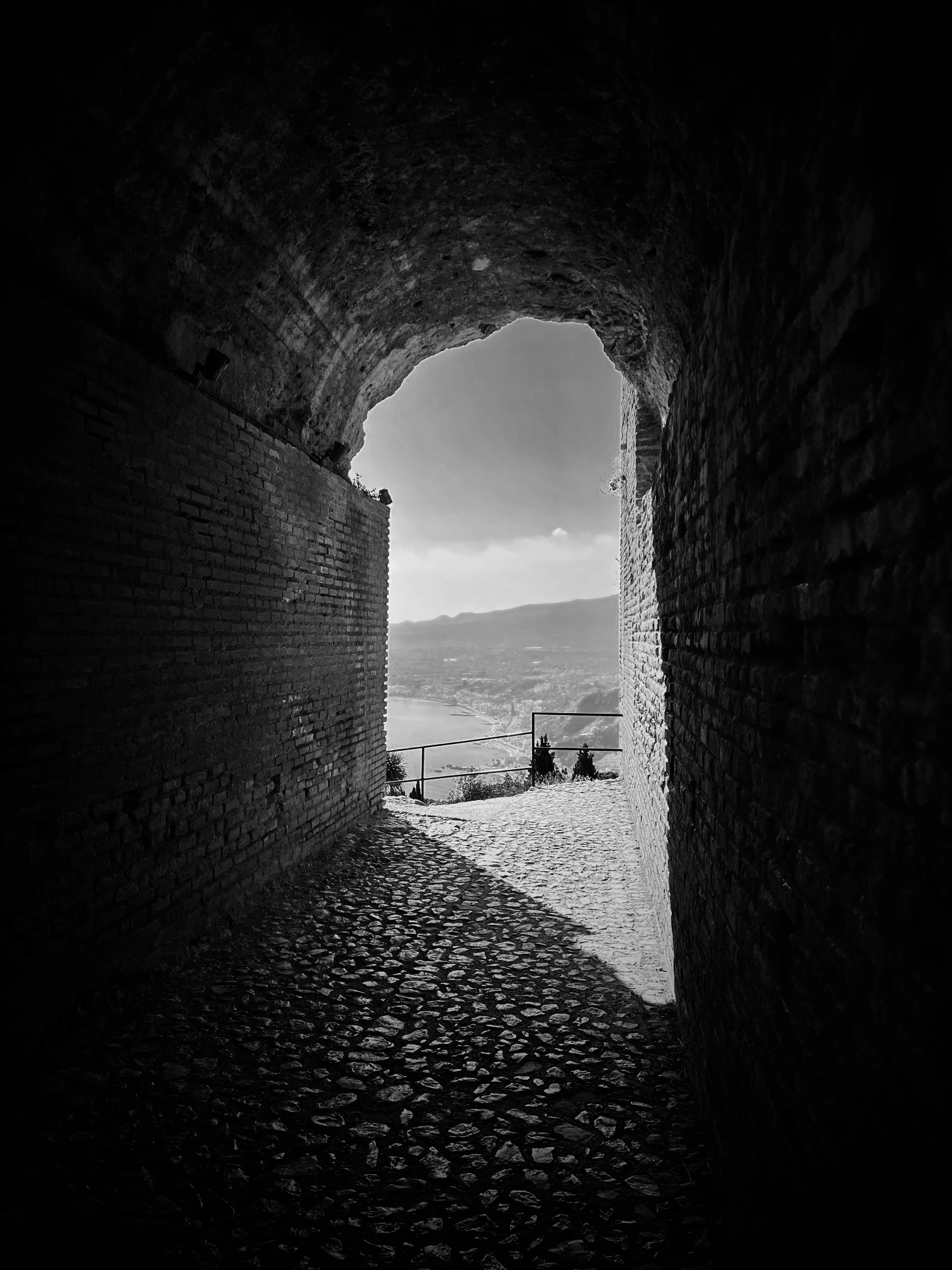
FIELD NOTES / 04
theme: Broadside
language: en-US
[.header: #ffffff, text-scale(1.4)]
[.text: #ffffff]
[.header-vertical-alignment: bottom]

### FIELD NOTES / 04
# A WIDER
# [fit] POINT OF VIEW
theme: Folio, 1
language: en-US
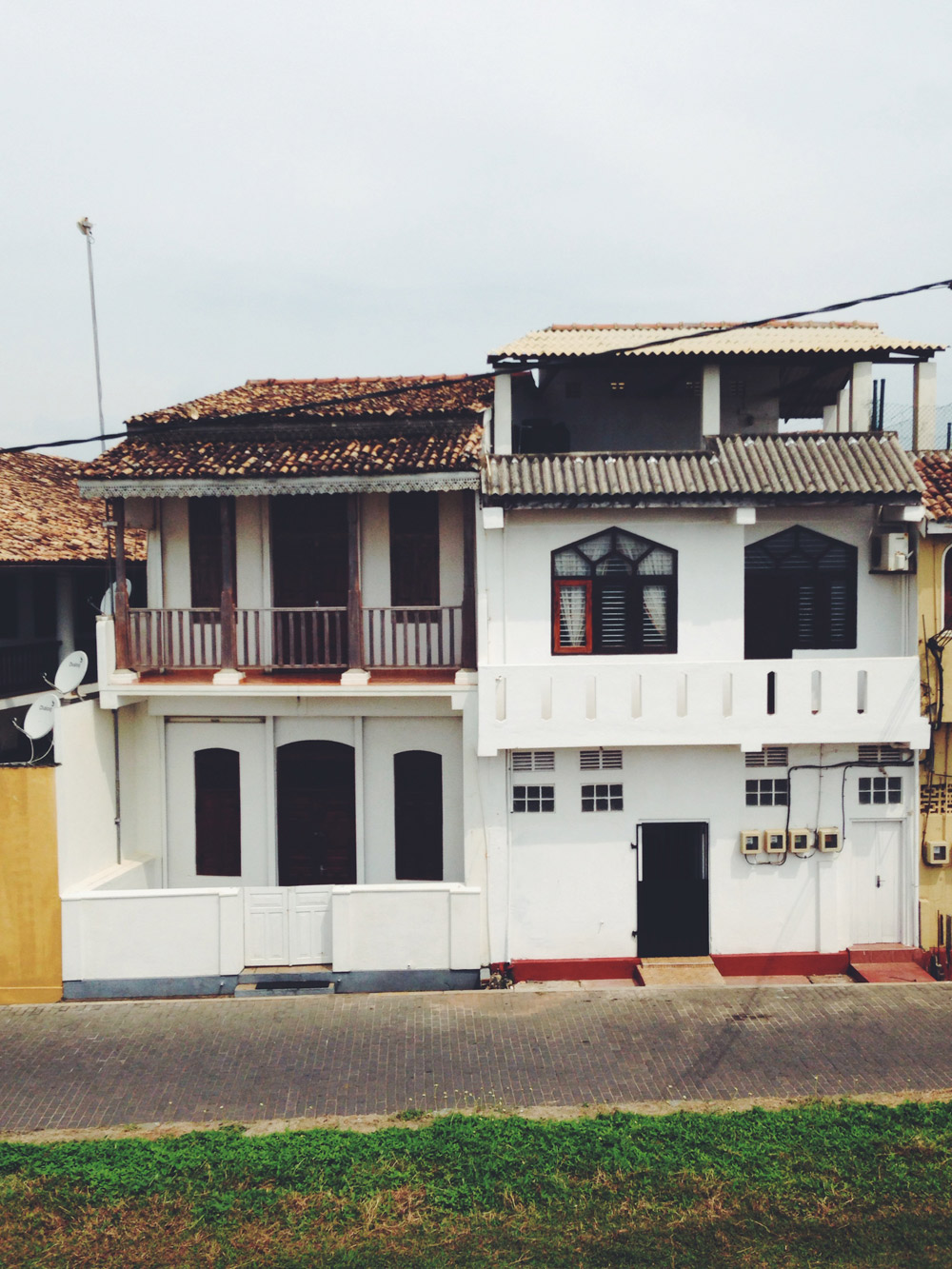
# A study in texture
 
theme: Merriweather, 1
language: en-US
code-background: window(github)
# A forecast in four lines
```javascript, [.title: temperature.js]
const toCelsius = k => k - 273.15;

const reading = toCelsius(285.65);
console.log(`${reading.toFixed(1)} °C`);
```
theme: Courier, 4
language: en-US

[.formula: text-scale(1.4)]

# Tune the signal

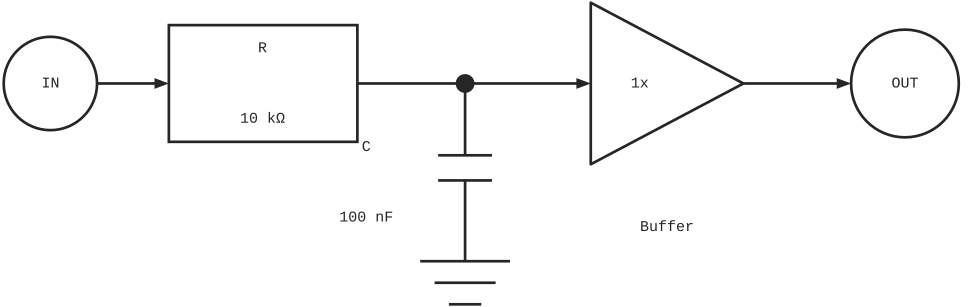
```pikchr
scale = 1.25
fontscale = 2.8
linewid = 0.35
boxwid = 0.9
boxht = 0.45
S: circle "IN" rad 0.26
arrow right 0.4 from S.e
R: box "R" "10 kΩ" wid 1.05 ht 0.65
line right 0.6
J: dot rad 0.045
arrow right 0.7 from J
A: line from last.end + (0,0.45) down 0.9 then right 0.85 up 0.45 then left 0.85 up 0.45 close
arrow right 0.6 from A.e
O: circle "OUT" rad 0.3
line down 0.4 from J
P: line right 0.3 from last.end - (0.15,0)
line right 0.3 from P.start - (0,0.14)
line down 0.45 from last.center
G: line right 0.5 from last.end - (0.25,0)
line right 0.34 from G.center - (0.17,0.12)
line right 0.18 from G.center - (0.09,0.24)
"C" "100 nF" at J + (-0.55,-0.55)
"1x" at A + (-0.15,0)
"Buffer" at A + (0,-0.8)
```

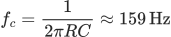
$$f_c = \frac{1}{2\pi RC} \approx 159\,\mathrm{Hz}$$
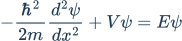
The simplest way to write the time-independent Schrödinger
equation is  , however, with the Hamiltonian operator
expanded it becomes:
, however, with the Hamiltonian operator
expanded it becomes:
theme: Titillium
language: en-US
footer: © The Deckset Team
[.background-color: #b2babc]
[.header: #1b3954]
[.text: #1b3954]
[.footer-style: #1b3954]

# Schrödinger equation

The simplest way to write the time-independent Schrödinger equation is $$H\psi = E\psi$$, however, with the Hamiltonian operator expanded it becomes:

$$-\frac{\hbar^2}{2m}\frac{d^2\psi}{dx^2}+V\psi=E\psi$$
theme: Titillium, 4

# Manned Apollo Missions

Mission | Rocket | LV Serial | Commander | Launch Date
---|---|---|---|---:
Apollo **1** | Saturn IB | AS-204 | Grissom | Feb 21 1967
Apollo **7** | Saturn IB | AS-205 | Eisele | Oct 11 1968
Apollo **8** | Saturn V | AS-503 | Borman | Dec 21 1968
Apollo **9** | Saturn V | AS-504 | mcDivitt | Mar 3 1969
Salt in the air.Light on the horizon.A place to begin.
theme: Zodiak, 1
language: en-US

# Built for the coast
Salt in the air.
Light on the horizon.
A place to begin.

theme: Zurich, 3
language: en-US

[.header: text-scale(1.55)]
[.graph: dark-mode(false)]

# From edge to insight

```mermaid, [.description: Two sensor streams converge at a gateway, enter a queue and validation worker, then branch into an archive and a forecast model feeding an API and dashboard. Failed validation enters a review queue.]
flowchart LR
  subgraph Edge[AT SEA]
    direction TB
    A[Buoys] --> G[Gateway]
    B[Weather] --> G
  end
  subgraph Process[ON SHORE]
    direction TB
    Q[Message queue] --> V{Valid reading?}
    V --> M[Forecast model]
    V --> R[Review + retry]
    V --> S[(Archive)]
  end
  subgraph Delivery[DELIVERY]
    direction TB
    API[API] --> D[Dashboard]
    API --> N[Alerts]
  end
  G --> Q
  M --> API
  R -.-> Q
```
theme: Ledger, 2
language: en-US

# [fit] Three sites.
# [fit] Six weeks.[^1]

[^1]: Illustrative pilot plan, not research results.
theme: Work, 4
language: en-US

[.header: text-scale(1.9)]

[.uniform-column-scaling]

# Choose the next experiment

[.column]

## Go deeper

- Study one harbor
- Add more sensors
- Compare tidal cycles

[.column]

## Go wider

- Visit three harbors
- Reuse the same kit
- Compare local conditions
Field notes / Northline coastal researchApril · June · September
theme: Plain Jane, 6
language: en-US
logo: https://www.deckset.com/static/presentations/home-gallery/08-corner-logo/assets/08-corner-logo-6df1099dba606f5e/b992b79ef5c94e24a0e9209d417c8183/northline-dark.svg, top-right, large, margin(40), alt(Northline)

[.header: text-scale(1.35)]
[.text: text-scale(0.85)]

# The spring survey

Field notes / Northline coastal research
April · June · September
theme: Fira, 3
language: en-US

[.code: dimmed-opacity(0.22)]
[.code-highlight: 2-4]

# Handle the empty state

```swift, [.line-numbers: true]
func average(_ readings: [Double]) -> Double? {
    guard !readings.isEmpty else {
        return nil
    }
    return readings.reduce(0, +) / Double(readings.count)
}
```
theme: Broadside, 2
language: en-US
build-lists: true

[.header: text-scale(1.3)]
[.list: text-scale(1.5)]

# Before we
# leave the harbor

1. Check the weather
2. Calibrate the sensors
3. Log the departure
Turn the notes we already write into a clear presentation.
theme: Broadside
language: en-US
[.background-color: #7268ff]
[.header: #ffffff]
[.text: #ffffff]

# The calmer way to make slides
## Start with an outline

Turn the notes we already write into a clear presentation.

- Keep the source simple
- Let the layout follow
A few useful answers
You only need a few Markdown basics to make your first presentation. Learn more features when you need them.
Visit Deckset supportNo. You only need a few Markdown basics, and Deckset includes example presentations you can edit.
Yes. Headings create structure, paragraphs and lists become slides, and presenter notes keep the details off the screen.
Deckset applies your theme and lays out each slide as you write. You can still choose themes and add precise styling when a presentation calls for it.
Deckset is available for Mac, iPhone, and iPad. The Mac app works with your preferred text editor, while the iOS app includes an editor for working directly on the device.
Yes. Review and refine an AI-generated outline, then open it in Deckset. The Deckset AI Slide Builder Skill also helps compatible agents produce Deckset-ready presentations.
Your next presentation may already be written
Deckset for iPhone and iPad
Write, edit, preview, and present on iPhone or iPad. Your themes and presentation files work across your devices.